Field Service Cloud Features for Landscape Maintenance

See the tools that help landscape teams plan routes, support crews, capture jobsite details, and review work before pricing or billing decisions.

Office planning and crew field work stay together.

Field Manager

Office teams plan schedules, dispatch work, review service and labor details, run reports, and answer customer or billing questions faster.

Field Assistant

Crews open mobile schedules, tasks, maps, notes, photos, custom forms, time, materials, and location-based task reminders from the field.

The same job details move with the work Keep your work pattern. Replace paper, re-entry, and scattered follow-up with jobsite details managers can trust.

Built for landscape crews in the field: Field Assistant works offline, switches to Spanish when phones are set to Spanish, and supports location-based reminders for assigned tasks.
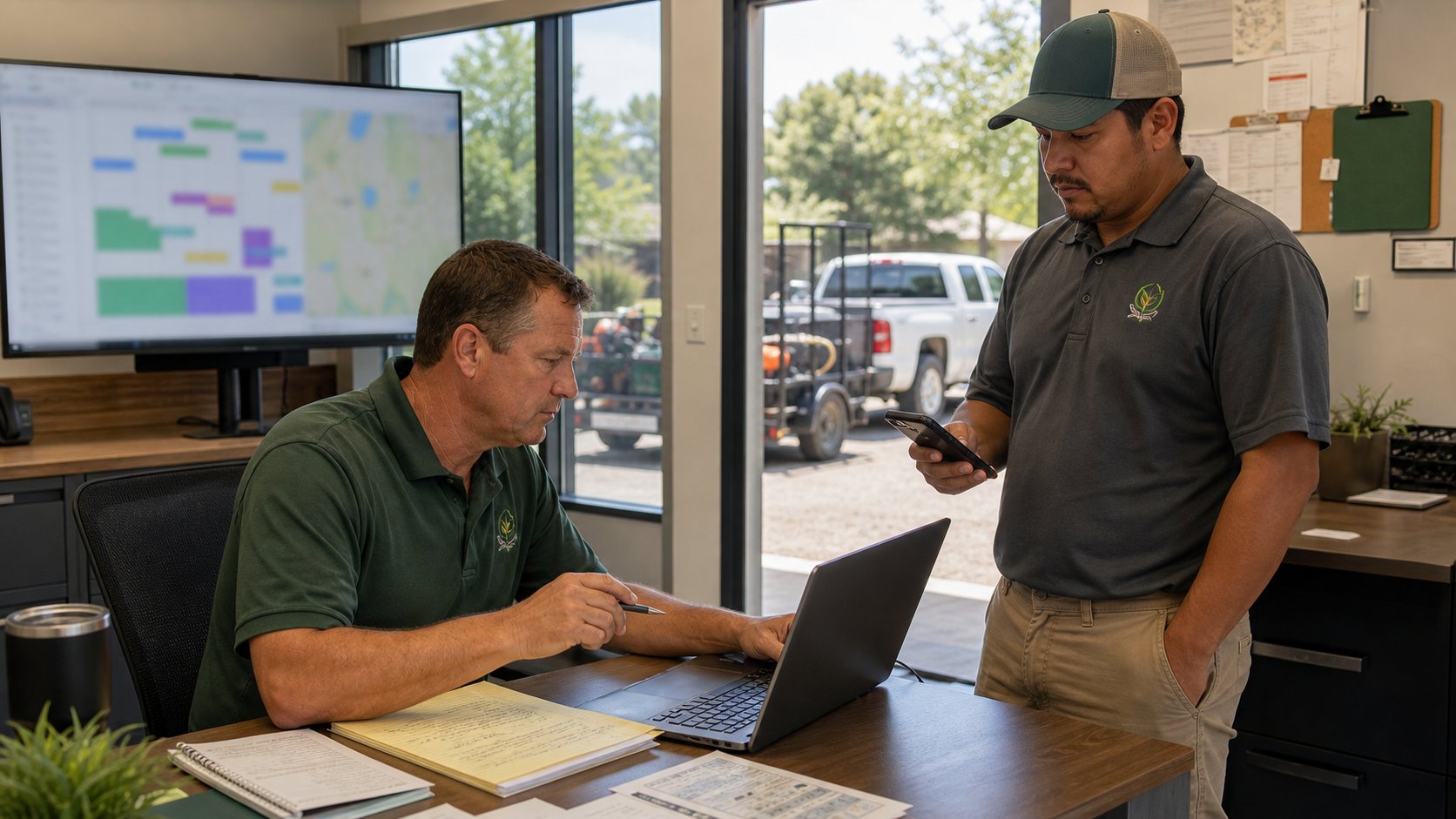
Landscape operations manager coordinating Field Manager office planning with Field Assistant mobile crew updates.

Browse the Field Service Cloud Feature Areas

Browse by work goal: plan routes, support crews, or review what happened before decisions are made.

Browse by workday stage Find tools that plan routes, support crews, or review completed work before customer follow-up and billing.

Showing all feature areas.

Want to see complete landscape service examples? See how related tools work together around job costing, customer follow-up, irrigation inspection and repair follow-up, billable extras, pesticide records, and per-service billing.
View Examples

Build routes crews can actually run

Plan routesSupport crews
  • Send crews a live schedule on their phones so route changes, service windows, and jobsite notes stay current.
  • Plan maintenance, enhancements, and one-off work from the same drag-and-drop schedule.
  • Balance route days before dispatch with service-time totals and visible crew assignments.
  • Keep office and field aligned when the day changes after trucks leave the yard.
Field Manager route edit screen showing drag-and-drop maintenance route scheduling
View Full Screenshot
Drag and drop jobsites to balance maintenance routes before trucks leave the yard.

Keep Client Requests Visible Through Completion

Plan routesSupport crewsReview margin
  • Improve service follow-through by keeping client requests in one place.
  • Increase crew accountability with clear assignments, due dates, and status updates.
  • Keep attachments and task notes with the customer request for cleaner follow-up.
  • Resolve jobsite issues faster with crew photos, notes, and status updates.
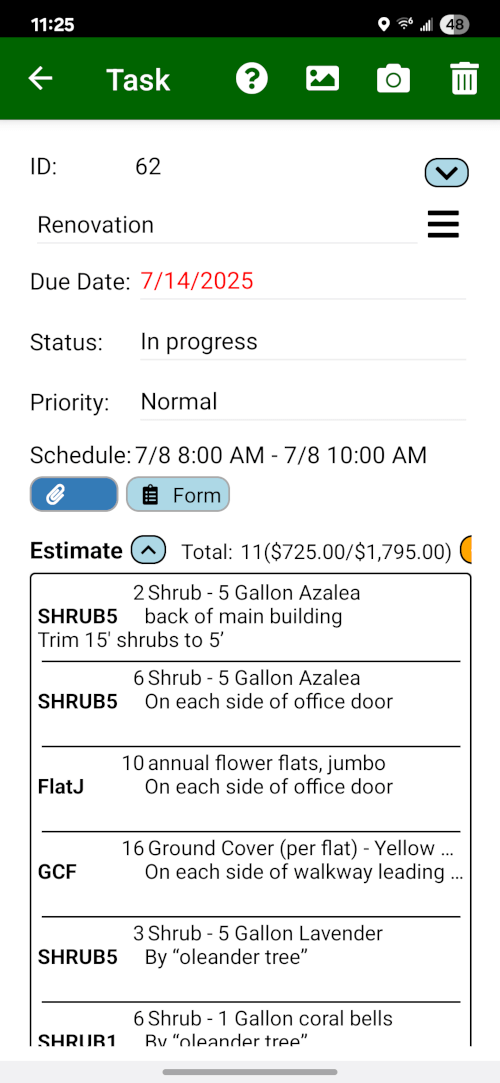
Field Assistant task list with enhancement tasks, site inspection work, due dates, statuses, and assigned work context.
Review and update assigned tasks in the field with Field Assistant.

Create estimates from approved field details

Plan routesSupport crewsReview margin
  • Build estimates from approved items so pricing stays consistent across account managers and service lines.
  • Use photos, notes, and material details from the field while the work is still fresh.
  • Track open proposals so enhancement and repair follow-up stays visible.
  • Hand approved work to billing with cleaner detail when QuickBooks is configured.
Field Assistant irrigation repair estimate with all ten Fox HOA station sections, all-working notes, repair parts, and labor.
Build sectioned estimates with parts, labor, and notes tied to the task.

Give crews property context before they arrive

Plan routesSupport crews
  • Show service zones and access points so crews understand the property without a separate paper map.
  • Clarify scope and measurements for bids, enhancements, and recurring maintenance areas.
  • Keep hazards, gates, and special notes visible where crews need them.
  • Preserve property knowledge when routes change or a new crew covers the site.
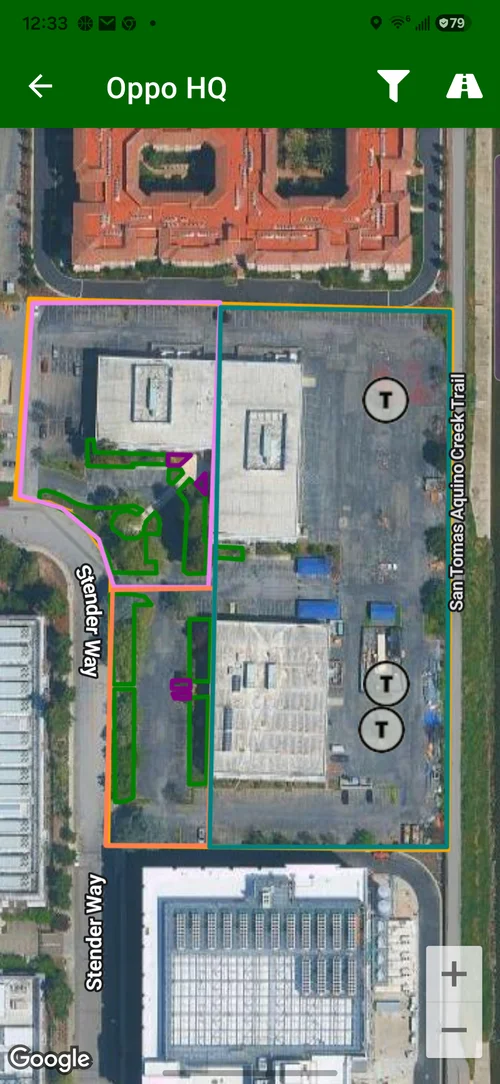
Field Assistant Oppo HQ jobsite map with service zones, commercial property context, and all filters visible.
Give crews a visual understanding of the jobsite.

Review route activity and jobsite time

Support crewsReview margin
  • See scheduled and actual activity so managers can answer service questions with better context.
  • Create service proof with GPS-backed arrival and departure records.
  • Improve labor review with jobsite time that supports bid and route decisions.
  • Find crews faster when same-day changes or urgent calls need a dispatch decision.
Field Manager GPS proof screen comparing scheduled stops with actual landscape crew activity
View Full Screenshot
Compare scheduled stops with actual service activity before clients call.

Capture time for payroll and labor review

Support crewsReview margin
  • Reduce paper time entry by letting crews record the day from Field Assistant.
  • Simplify payroll review with employee-level clock records.
  • Add man-hours to jobsite labor review when your company uses timesheets.
  • Compare labor expectations to actuals before the next bid or route change.
Field Manager jobsite monthly man-hours report showing labor budget and actual hours
View Full Screenshot
Turn GPS-backed timesheets into job-costing proof.

Track materials while crews are still on site

Support crewsReview margin
  • Record plants, parts, and materials on the task where the work happened.
  • Reduce missed billing handoffs by keeping billable items visible for office review.
  • Reduce re-entry by using crew-captured material records.
  • Answer customer questions faster with details tied to the job record.
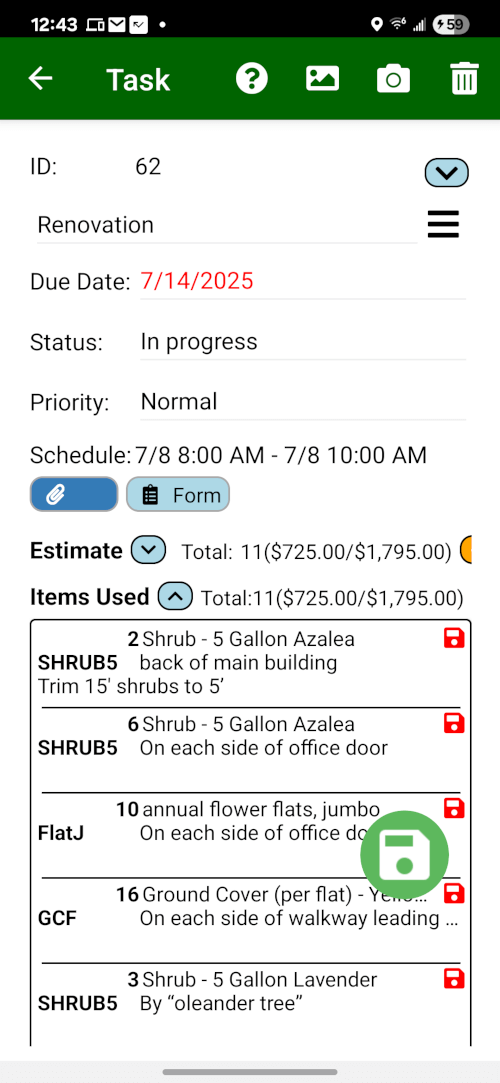
Field Assistant Fox HOA enhancement items-used screen with work-area sections, item counts, attachment counts, and totals.
Keep enhancement materials and labor visible for office invoice review.

Replace paper forms with searchable records

Support crewsReview margin
  • Capture inspections, safety checks, and service records from the phone.
  • Attach forms to the related customer, jobsite, or task so the office can find them later.
  • Include photos and signatures when the record needs proof.
  • Reduce paperwork handling for office managers and account managers.
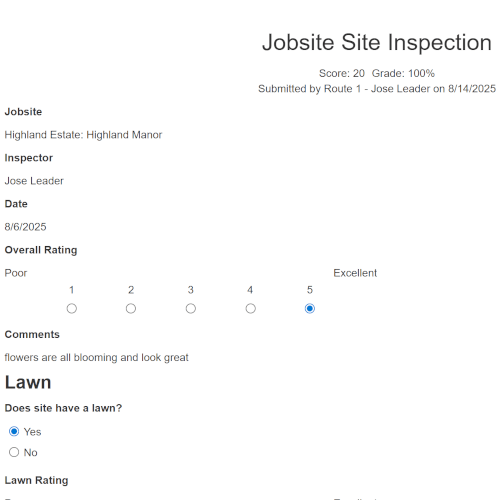
Field Manager completed site inspection records with submitter, jobsite, employee, score, and grade.
Review completed field forms as searchable office records.

Keep irrigation maps and service records together

Support crewsReview margin
  • Give technicians irrigation maps with controllers, valves, stations, and repair context.
  • Preserve site knowledge when a technician changes routes or leaves the company.
  • Keep inspection notes and repairs connected to the same customer and jobsite.
  • Move from inspection to estimate with clearer parts, labor, and photo detail.
Field Assistant irrigation estimate with all ten Fox HOA station sections, all-working notes, repair parts, and irrigation labor.
Keep station notes, repair parts, and labor tied to the irrigation task.

Keep pesticide application records ready

Support crewsReview margin
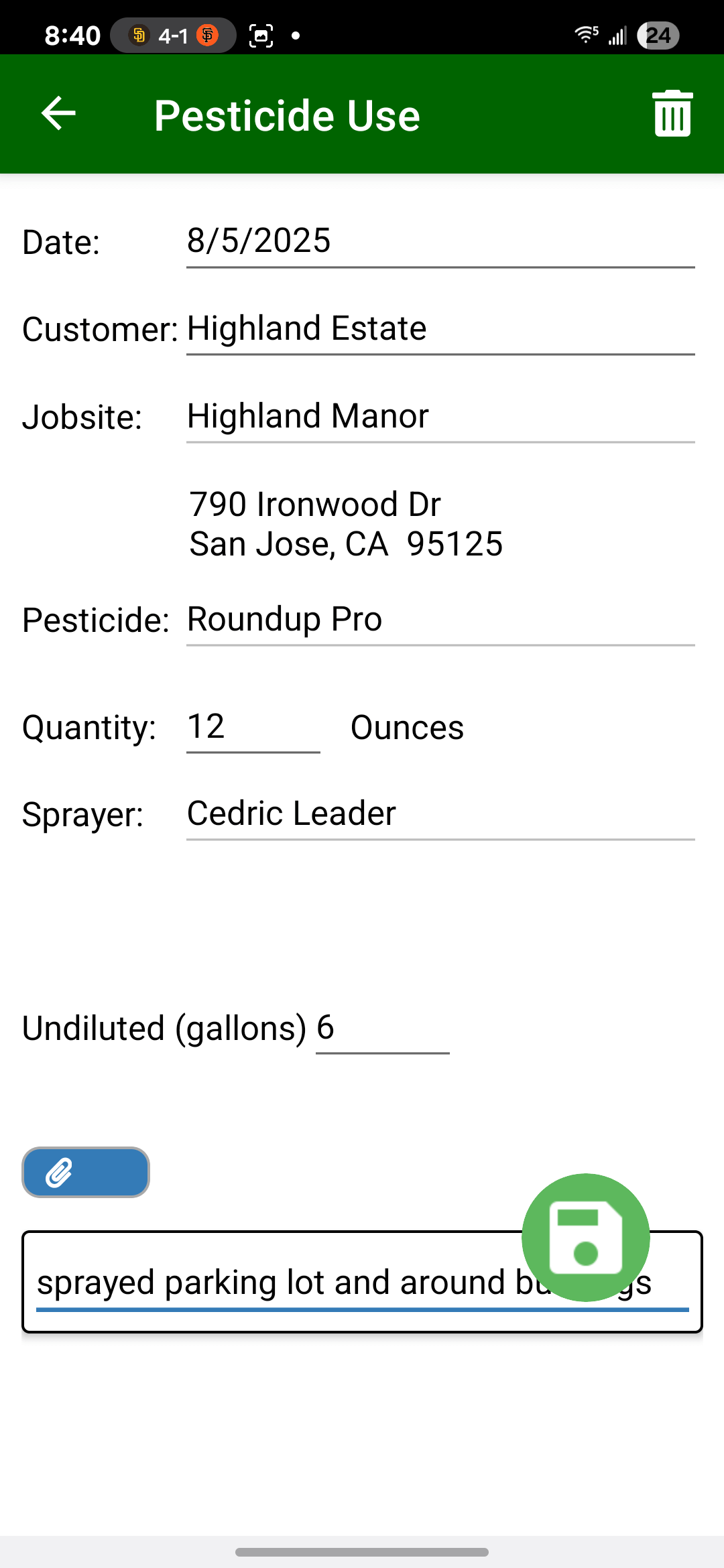
  • Capture application details in the field while the crew still has the work in front of them.
  • Review completed records in the office before customer questions, product-use review, or reports.
  • Keep labels and SDS available from the phone, including offline access where supported.
  • Prepare reports including California MS-PUR / CalAgPermits submission where applicable.
Field Assistant pesticide use list showing May Roundup Pro applications across commercial landscape jobsites.
Keep pesticide-use history visible by jobsite, product, quantity, and date.

Hand reviewed work to QuickBooks

Review margin
  • Reduce duplicate entry between operations and accounting.
  • Use reviewed service records before billing handoff.
  • Prepare monthly maintenance and completed extras where your QuickBooks setup is configured.
  • Keep customers, items, estimates, and invoice detail aligned where your QuickBooks setup supports it.
Field Manager contracted services screen showing monthly maintenance services ready for QuickBooks invoicing
Click to zoom
Review monthly maintenance services before QuickBooks handoff.

Review service history, labor, and exceptions

Review margin
  • Review completed service history with the field details tied to the jobsite.
  • See labor, materials, revenue, and margin context before pricing or route decisions.
  • Find exceptions and follow-up needs without rebuilding the story from calls and notes.
  • Give owners and managers one review point for service quality and profit questions.
Field Manager Jobsite Snapshot report showing recent visits, follow-up items, pesticide uses, supply uses, and form responses.
View Full Screenshot
Review jobsite history and current follow-up from one report.

Explore All Features

Build routes crews can actually run

Plan routesSupport crews
  • Send crews a current route schedule on their phones, reducing calls and confusion.
  • Plan recurring and one-off work from the same drag-and-drop schedule.
  • Reduce overloaded or under-scheduled route days with automatic service time totals.
  • Visually balance route days before dispatch, reducing backtracking and wasted drive time.
Field Manager route edit screen showing drag-and-drop maintenance route scheduling
View Full Screenshot
Drag and drop jobsites to balance maintenance routes before trucks leave the yard.

Keep Client Requests Visible Through Completion

Plan routesSupport crewsReview margin
  • Improve service follow-through by keeping client requests in one place.
  • Increase crew accountability with clear assignments, due dates, and status updates.
  • Keep attachments and task notes with the customer request for cleaner follow-up.
  • Resolve jobsite issues faster with crew photos, notes, and status updates.
Field Assistant task list with enhancement tasks, site inspection work, due dates, statuses, and assigned work context.
Review and update assigned tasks in the field with Field Assistant.

Create estimates from approved field details

Plan routesSupport crewsReview margin
  • Build estimates from approved items so pricing stays consistent.
  • Increase your win rate with a faster, more impressive process.
  • Improve pricing consistency across your estimating team.
  • Track open proposals so enhancement and repair follow-up stays visible.
Field Assistant irrigation repair estimate with all ten Fox HOA station sections, all-working notes, repair parts, and labor.
Build sectioned estimates with parts, labor, and notes tied to the task.

Give crews property context before they arrive

Plan routesSupport crews
  • Show service zones and access points so crews understand the property.
  • Clarify scope and measurements for bids, enhancements, and maintenance areas.
  • Keep hazards, gates, and special notes visible where crews need them.
  • Preserve property knowledge when routes change or a new crew covers the site.
Field Assistant Oppo HQ jobsite map with service zones, commercial property context, and all filters visible.
Give crews a visual understanding of the jobsite.

Review route activity and jobsite time

Support crewsReview margin
  • Create service proof with GPS-backed arrival and departure records.
  • Add labor context with GPS-backed jobsite time records.
  • Review crew activity and route exceptions with better context.
  • Respond to urgent work by seeing nearby crews during the workday.
Field Manager GPS proof screen comparing scheduled stops with actual landscape crew activity
View Full Screenshot
Compare scheduled stops with actual service activity before clients call.

Capture time for payroll and labor review

Support crewsReview margin
  • Reduce manual data entry every week.
  • Simplify payroll prep with reviewable mobile time records.
  • Add labor context for pricing and margin review.
  • Spot accounts that need review before the next bid or renewal.
Field Manager jobsite monthly man-hours report showing labor budget and actual hours
View Full Screenshot
Turn timesheet and GPS records into labor review context.

Track materials while crews are still on site

Support crewsReview margin
  • Capture more billable materials with field records tied to the job.
  • Increase invoice accuracy and reduce client billing disputes.
  • Reduce manual data entry with crew-captured material records.
  • Reduce missed billing handoffs by keeping completed extra work visible for invoice review.
Field Assistant Fox HOA enhancement items-used screen with work-area sections, item counts, attachment counts, and totals.
Keep enhancement materials and labor visible for office invoice review.

Replace paper forms with searchable records

Support crewsReview margin
  • Reduce the costs and errors of manual data entry.
  • Improve safety and compliance follow-through with required digital forms.
  • Reduce your business's liability risk with photo and signature capture.
  • Create searchable field records for faster office review and documentation requests.
Field Manager completed site inspection records with submitter, jobsite, employee, score, and grade.
Review completed field forms as searchable office records.

Keep irrigation maps and service records together

Support crewsReview margin
  • Preserve irrigation site knowledge when a technician changes routes or leaves the company.
  • Help new irrigation techs get oriented faster with maps and service records on the phone.
  • Reduce cumbersome paperwork and scattered spreadsheets.
  • Help technicians service faster with irrigation context on the phone.
Field Assistant irrigation estimate with all ten Fox HOA station sections, all-working notes, repair parts, and irrigation labor.
Keep station notes, repair parts, and labor tied to the irrigation task.

Keep pesticide application records ready

Support crewsReview margin
  • Capture application details in the field while the crew still has the work in front of them.
  • Review completed records in the office before customer questions, product-use review, or reports.
  • Keep labels and SDS available from the phone, including offline access where supported.
  • Prepare reports including California MS-PUR / CalAgPermits submission where applicable.
Field Assistant pesticide use list showing May Roundup Pro applications across commercial landscape jobsites.
Keep pesticide-use history visible by jobsite, product, quantity, and date.

Hand reviewed work to QuickBooks

Review margin
  • Reduce duplicate entry between operations and accounting.
  • Use reviewed service records before billing handoff.
  • Prepare monthly maintenance and completed extras where QuickBooks is configured.
  • Keep customers, items, estimates, and invoice detail aligned where your QuickBooks setup supports it.
Field Manager contracted services screen showing monthly maintenance services ready for QuickBooks invoicing
Click to zoom
Review monthly maintenance services before QuickBooks handoff.

Review service history, labor, and exceptions

Review margin
  • Review completed service history with the field details tied to the jobsite.
  • See labor, materials, revenue, and margin context before pricing or route decisions.
  • Find exceptions and follow-up needs without rebuilding the story from calls and notes.
  • Give owners and managers one review point for service quality and profit questions.
Field Manager Jobsite Snapshot report showing recent visits, follow-up items, pesticide uses, supply uses, and form responses.
View Full Screenshot
Review jobsite history and current follow-up from one report.

Want to see which tools fit your operation first?

Bring one route, crew workflow, service line, customer follow-up path, or billing review question. We will walk through the Field Service Cloud features that apply to your current process.

Book a Live Walkthrough See Rollout Steps