Digital forms for field records and quality reviews
Build mobile forms for inspections, safety checks, service notes, customer-specific records, photos, signatures, and scored quality reviews so field answers become searchable office records.
Capture what your field operation needs
Create forms around the checks, notes, photos, and records your crews already handle in the field.
- Complete Forms in Field Assistant
- Review Safety Checks and Incident Records
- Keep Photos and Signatures with the Form
- Find Submitted Forms by Jobsite
- Give the Office the Crew's Recorded Answers
- Compare Quality Scores Over Time
Step 1: Build the form your crew needs
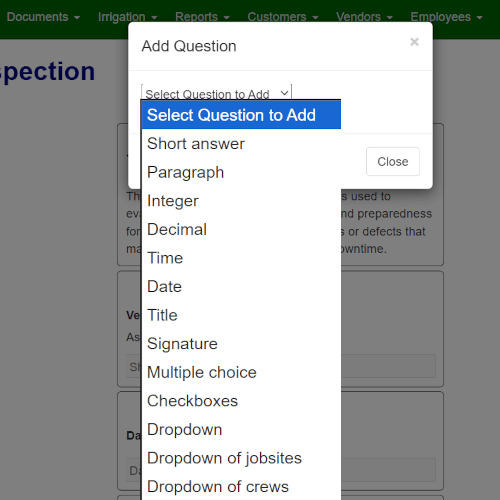
Create forms around safety checks, site inspections, equipment, incidents, customer-specific notes, and other field details that need to come back as searchable records.
- Flexible Question Types: Use checkboxes, photos, signatures, notes, smart pickers, and scored rating questions for jobsites or employees.
- Improve Completed Records: Make critical questions required so office review starts with a more complete field record.
- Match the Work You Track: Create forms for jobsite inspections, vehicle checks, client feedback, incident reports, crew notes, and other field records.

Step 2: Get the record back from the field
Field Assistant makes mobile forms simple for crews, so the office gets useful field details without collecting paper from trucks.
- Simple Mobile Capture: Crews complete clean forms from the phone, reducing handwriting and paper handling.
- Required When Needed: Attach forms to tasks when the record must be completed before closeout.
- Issue Reporting: Let crews report equipment issues, safety hazards, or customer notes as standalone forms.
Step 3: Turn forms into records managers can compare
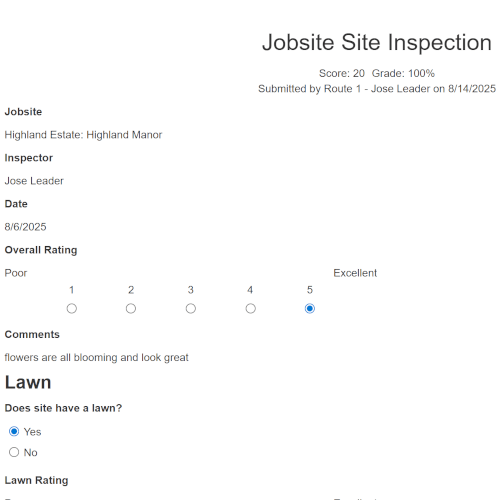
Completed forms become searchable office records, so managers can review field answers, photos, signatures, exceptions, and quality scores without collecting paper from trucks.
- Find Completed Forms: Search completed forms by date, jobsite, crew, or form type.
- Score Quality Reviews: Use scored rating questions for turf, pruning, irrigation, cleanup, color beds, or overall appearance.
- Compare Review History: Review score and grade history by jobsite, crew, form, or date to spot properties that need follow-up.
Want to see forms become searchable quality records?
Walk through field checklists, scored quality reviews, completed forms, photos, signatures, and office review.
Book a Live Walkthrough