How to answer landscape maintenance customer concerns
Janmar Systems · Field Service Cloud Resources
A property manager asks whether the branches blocking a walkway have been cleared. The original photo is in a crew leader's text thread. Someone mentioned the job at the yard, but the account manager cannot tell who picked it up. Another call interrupts the crew, and the customer is still waiting.
A dependable customer answer starts with the current work record: what was requested, who owns it, what happened and what remains. Keeping those details together lets the manager continue the conversation where the crew left it, with a clear next action when completion is still unconfirmed.
Use this routine when requests are getting lost, customers need repeated follow-up or the office keeps interrupting crews to reconstruct work. Use the four steps with your current tools to create a clear request, get a usable crew update and choose an accurate reply for completed, unfinished or unconfirmed work. Agree who reviews the result and answers the customer. If the handoff already gives dependable answers with little chasing, another problem may deserve attention first.
1. Put the concern where the next person can find it
Record the property, the location on site, and what needs attention. Add a photo when it helps identify the problem or the result. For the walkway example, the next person needs to know which entrance and which branches, not just that there is a pruning problem.
Use this request pattern in the record your company already keeps:
Property: [name]. Location: front walkway at the main entrance. Requested result: clear the low branches obstructing the walkway. Assigned to: [crew or leader]. Due date or next review: [date]. Reference photo: [attachment or link].
The office can supply the property, instruction and assignment before the crew starts. A precise location and requested result make it easier for a covering leader to act without another call. Agree who checks a request that has not been accepted or updated.
2. Make the next action clear
Agree who will inspect or clear the branches and when they are expected to act. A request buried in a message is easy to pass along without anyone owning it. An assignment gives the manager someone to follow up with.
Make sure the crew knows where the task fits in its work schedule and can find the current request and instructions. The crew gets a clear next action; the account manager can see who is responsible without another round of messages.
Before promising a visit date, check the assignment and timing. If timing is still being arranged, say so.
3. Leave a completion record someone else can use
After the work, the crew's description and a relevant photo should explain what changed. The manager can review the status and history without relying on a recollection from the end of the day.
A short crew update can follow this pattern:
Completed: [specific work and location]. Still open: [remaining work, or none]. Result photo: [attachment]. Next action, if needed: [person and agreed date, or a question for the manager].
Where the assigned record already identifies the property and crew, keep those details there and add the outcome. The crew leader should be able to leave one usable update that the office can review and reuse in its answer.
If only an inspection was completed, the next step may still be pruning. Resolve that gap before telling the customer the concern is closed.
An open request that receives no useful update needs follow-up too. The manager checks with the responsible leader: is the work unfinished, was the update missed, or has it not reached the office? Resolve the work and record, agree the next action, and check that it happens. Repeated missing updates may identify a training or instruction problem to address.
4. Answer the customer and close the loop
A useful response says what happened and what comes next. These examples give the same walkway concern three different answers. Adapt them to the current record, use a date you can meet, and refer to an attachment only when you have checked and included it.
Completed and checked
The low branches along the front walkway at the main entrance have been cleared. The attached completion photo shows that area. Please let me know if another part of the walkway needs attention.
Inspected, with pruning still open
Our crew inspected the front walkway and confirmed the branches need pruning. The return visit is scheduled for [date]. I'll check the result and update you by [time/date].
If the return visit is not yet agreed, explain that you are arranging it and give the next update time instead of calling it scheduled. An inspection update should leave the pruning visible as unfinished work.
Waiting for confirmation
I'm checking the walkway request with our crew leader so I can give you a confirmed status. I'll update you by [time/date] with the result or the next action.
Keep internal discussion in the work record. Give the customer the service answer they asked for.
For help shaping a response around the customer's preferences, the AI management guide shows a complete draft and follow-up. Supply the confirmed facts first; the manager still decides what to send.
Use the result to improve the next visit
If the same walkway concern returns, review the earlier work with the crew. Suppose the update says the branches were cleared, but the next visit's photo shows new growth blocking the same corner. Add that corner to the recurring pruning instruction and check it on a later visit. If the original instruction was missed instead, work through it with the leader. The record helps you choose between changing the work plan and coaching the handoff, rather than simply issuing the same request again.
After the next customer question, check whether the crew had clear instructions and the manager could answer from the record. A missing location or completion detail gives you one specific habit to improve in this handoff.
If you are evaluating software
Bring a concern your company actually receives. Ask to see the office assign it, then have someone use the crew's phone view to find the instruction, enter an update and add a photo. Follow the saved result back to the manager. Check what the crew must learn, what happens without a connection, and how the office knows it has the current record. That is the handoff you are evaluating.
Include an unfinished job: the crew inspected the walkway but needs another visit to clear it. Can the manager see what remains, give someone the next action and answer the customer accurately? Check both the normal result and that exception from the crew and office views. Use the selection guide to compare the demonstrated result with the learning and continuing review your team would need.
Example: following a concern in Field Service Cloud
For the walkway request, the office and crew can use one task record for the instruction, status, notes and attachments. If the leader already tells the office what was done and sends a result photo, that familiar work moves into the assigned request in Field Assistant. The leader does not need to prepare a separate customer report.
Before starting, the jobsite, crew assignment and crew's Field Assistant access must be in place. Someone in the office owns the request and checks that it is assigned to the intended crew. Teach the leader how to find the instruction and leave a usable status and outcome; in this walkway example, that includes a completion photo. The manager must review the result and answer the customer. That is a complete useful handoff without adopting estimating, material entry or other task types. Add a checklist later if recurring missed details justify it, rather than requiring a form for every simple concern.
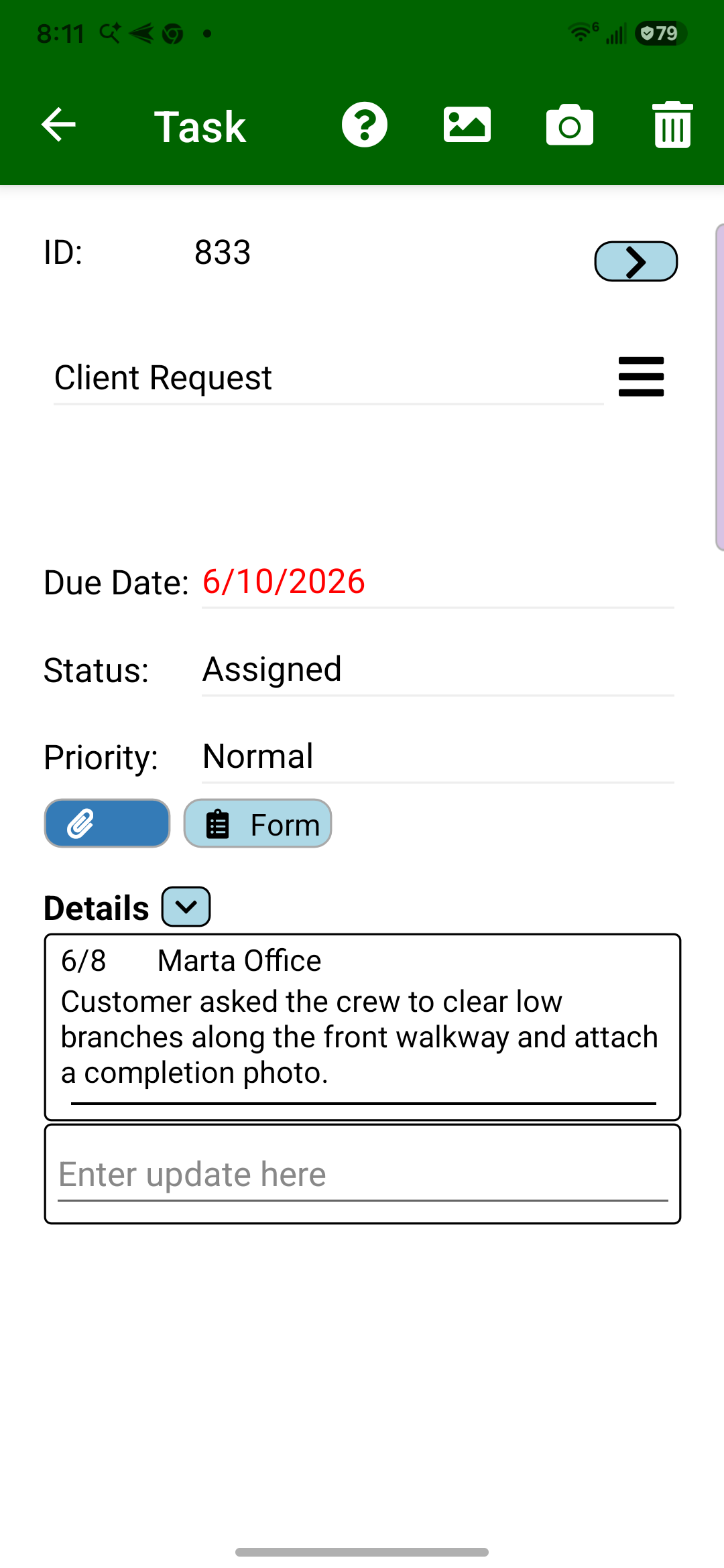
- The office assigns the front-walkway request to the intended crew: clear the low branches and attach a completion photo.
- The crew leader opens the assigned request from Field Assistant's task list and reads the Details before starting. If the instruction does not identify the right area, the leader asks for clarification rather than recording an unrelated pruning job as complete.
- After the work, the leader enters an update in Details, adds a relevant photo using Camera or Gallery, selects the appropriate Status and saves the task. If the crew only inspected the walkway, or could not finish, the update explains what remains instead of closing the concern prematurely.
- Field Assistant saves the task on the phone; its updates and photos reach the office through synchronization. Before relying on the office record, confirm that the latest update and photo have arrived. Follow up with the leader if the office is still showing an older result.
- The manager reviews the current task status, work description and attachment. The customer answer can now explain which area was addressed and whether anything remains. The manager sends that response through the company's usual customer communication process; recording the task does not automatically send it.
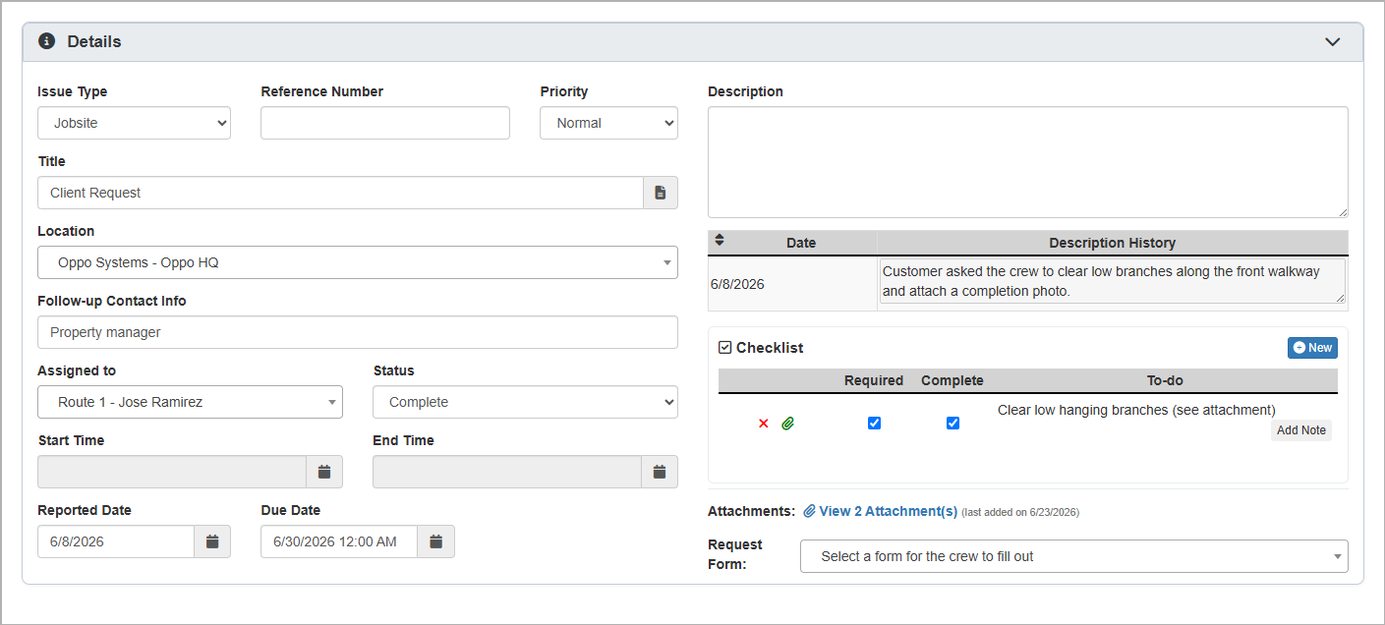
The instruction and synchronized crew update stay with the property concern. A manager covering the account can review the assigned crew, status, notes and photo without first finding the person who received the original text. Existing task reports help the office find open work for follow-up; the manager then checks the relevant record and decides the next action. This replaces a separate status list and repeated requests for the same update where those are used today. Missing updates and unfinished work still need attention.
Explore Customer Requests & Site Follow-Up for the Field Service Cloud workflow. Book a Live Walkthrough with a concern your company handles.