Choosing landscape maintenance software your team will actually use
Janmar Systems · Field Service Cloud Resources
Choosing landscape maintenance software starts with a value question: will it improve your company enough to justify the money and time needed to use it? A useful result might be fewer calls to find out what happened at a property, a completed extra ready for billing review, or a better basis for planning next week's routes.
Improve a familiar workflow first, check the result, and add capabilities when they solve another problem your team is ready to address. You do not need to use every feature to get value, but the part you choose must do its job dependably. A broader redesign can be worthwhile when your team can protect the time to lead it.
Use this guide to compare the improvement you need with the money, staff time and changes required. The scorecard helps you leave with a decision you can explain: buy, narrow the proposal, retain a useful existing tool or defer the change until its conditions are workable.
Start with your operation and one priority
Before a demonstration, write down:
- What you want to keep: useful routines, QuickBooks, and other tools that already work.
- Where work gets stuck: finding visit information, following up on property concerns, or getting repairs ready for billing.
- What should improve first: who needs a better answer, what they would do with it, and what repeated work could stop.
A company struggling to confirm visits may start with route information. One that already tracks visits well may need clearer repair records. Choose one workflow your team already has and define a useful first result. That gives each provider the same requirement to demonstrate.
Define what would make the change worthwhile
Describe the value in company terms. Better follow-up might mean an account manager can give a reliable customer answer without repeatedly interrupting the crew. Better field records might let the office review completed extras without reconstructing quantities days later. Better route information might help a manager investigate repeated overruns and improve the next plan. A new screen or a larger collection of data is useful when it supports an outcome your company needs.
Use a few recent examples to describe how the work happens now: which calls, searches, duplicate entries or unresolved questions it creates, who spends time on them and what decision is delayed. Choose a first result you can check against that starting point. The pay-for-itself check below turns that starting point into numbers you can compare.
Include company time in the cost even when it does not create a new invoice. Someone prepares records, makes setup decisions, learns the system, enters daily information and corrects mistakes. Managers also need time to check that employees are using the workflow correctly, follow up on missing entries, coach people and train replacements. Initial training does not settle those continuing responsibilities.
Compare the expected benefit with that staff commitment, subscription and other costs. If the new workflow removes a phone call but adds more reconstruction elsewhere, include both sides. A system can fit the process yet still offer too little improvement to justify the commitment.
Make sure it pays off
Taken together, the workflows you'll realistically use should give your company a good return: clearly more than they cost in money and staff time, not just break even. Each one you add should earn its place. Treat the first like a test plot: it shows whether the software takes root with your team before you plant the whole property. It doesn't have to cover the whole cost to be worth starting. Count each benefit from the month it starts, not the day you sign.
Count three kinds of payback separately.
Money is the easiest to see: charges you now collect instead of missing, and costs that stop, such as overtime, printing or another subscription. Billing sooner helps cash flow, but it isn't new revenue.
Recovered time is hours that stop going to calls, searches and re-entry. Saved hours only become money when they go somewhere: covering more accounts without a new hire, or less overtime. A more manageable day, or an owner getting evenings back, still matters. Just don't count it as cash.
Better customer service is the slow-growing payback. It takes longer to show, but it adds up:
- Fewer cancellations and non-renewals. Keeping a contract keeps the profit left after the cost of servicing it, and saves the selling effort to replace it.
- More work from customers you already have. A property manager who trusts your follow-up is more likely to approve extras, renew at a fair price increase and give you another property they manage.
- Word of mouth. A referral from a property manager or HOA board usually costs less to win than a cold bid.
- Fewer free return visits and credits, and less account-manager time spent answering the same concern twice.
Track return visits and credits as they happen. Over the year, note why accounts leave, how new customers heard about you and which properties came from managers you already serve. If one saved renewal or one referral brings in more profit than a year of the software costs, that alone may cover it. Treat it as upside until it happens.
Here is how the arithmetic could look for a company planning three workflows: visit visibility, extra-work records and customer follow-up. These are invented numbers; use your own, and keep cash separate from time.
| Today | Basis | Monthly value |
|---|---|---|
| Approved extras that would otherwise go unbilled (extra-work records) | 2 a month × $300 | $600 |
| Free return visits for concerns not handled the first time (customer follow-up) | 1 a month × $150 in overtime and fuel | $150 |
| Cash total | $750 | |
| Office time chasing crews and piecing together visits (visit visibility) | 5 hours a week × 4.3 weeks | 21.5 hours |
| Time to keep routes current and review exceptions | 2 hours a week × 4.3 weeks | 8.6 hours |
| Office time freed | 21.5 − 8.6 | About 13 hours |
Set the full rollout's $750 in cash against the subscription and other ongoing charges, such as devices and support. The freed office hours already subtract the upkeep shown here; set them against what you'll actually do with them. Include any additional recording or review time the other workflows require, without counting the same effort twice. Look for a clear margin, not a tie: the combined cash, time and service gains should comfortably outweigh the full commitment. If cash alone falls short, be sure the freed hours will go to more accounts, less overtime or fewer late evenings. Then estimate how many months it takes to earn back setup and training time.
In this example, the visit-visibility trial measures office time. Watch for more: better route decisions, fewer overruns and easier coverage when a leader is out. The Field Service Cloud example below shows where. The extras and follow-up lines come as you add those workflows.
Prove it before you count it:
- Measure today first. For two to four weeks, keep a simple tally: office hours spent finding out what happened, extras finished but not billed, days from completed work to invoice, calls to crews, how many days a customer concern stays open and how many free return visits you make.
- Run one workflow. Try your starting point on one route or crew. Six to eight weeks suits most recurring maintenance; run it long enough to see ordinary weeks and the exceptions.
- Measure the same things again. Compare like with like: the same crews, a similar season and the same way of counting. For customer service, look at the leading signs: concerns closed sooner, fewer repeat concerns at the same property and fewer free return visits.
- Decide from the result. Did the first workflow deliver its part, and what did it take? Use the answer to judge whether the full rollout still looks like a good return, and add the next capability when it solves a real need. If the result disappoints, find out why before spending more.
A demo shows what's possible. Your own numbers show whether it pays off.
Match the change to the time your team can give it
Company size alone does not tell you how much change an operation can absorb. A small company may have an owner or operations manager ready to lead a broader implementation. A medium-sized company may have more people but no spare time to redesign how they work.
If you can dedicate a champion, protect staff time, agree new procedures and follow up on adoption, a broader system may be a good fit. Your evaluation can include changing processes across scheduling, field reporting, purchasing and accounting. Ask who has the authority to make decisions and how the provider will support that person after training.
If the owner is also selling work, the office is stretched and crew leaders need to keep working, look closely at the first useful step. Can you keep familiar routes and responsibilities while replacing a spreadsheet, paper work order, repeated phone call or scattered shared-drive folder? Which setup will the provider do, and what must your team still learn and maintain?
Either way, someone has to own the change and check that it works. Judge the rollout being proposed, not just the size of the feature list.
Count the actions the first workflow requires
For a visit-visibility priority, consider the crew actions needed on a full maintenance route. Manual jobsite clocking may require an arrival and departure action at each property. A missed clock-out, late clock-in or wrong property selection can leave records for the office to investigate and correct.
If your process requires one arrival and one departure clock action at every property, a 12-stop route means 24 clock actions per crew per day. Five crews on routes of that size would make 120.
Those actions may be worthwhile when they supply information your company needs, such as individual employee hours, time allocated to different tasks, or a record someone must review and approve. Automatic crew activity and employee time records answer different questions. Ask what each method actually records, what still needs employee input or approval, and whether the useful information justifies the entry and correction effort. Fewer taps alone do not establish better value.
Ask each provider to show a full route, including a missing or incorrect entry. How is information collected, who notices a gap, and who fixes it? Review automatic activity records too, and check the work record before confirming which services were completed.
Count office work as well. In the demonstration, distinguish information collected or calculated automatically, familiar work moved into the application, and genuinely additional entries. If the crew already reports completion and quantities, can those entries also supply the office review and existing reports? Have the manager get the answer without first building a spreadsheet or asking every leader for another summary. Include device checks, missing records and maintained assignments in the comparison. A smaller company needs to know what its current team can accomplish and which existing work can stop.
If the last system did not stick
Take one recent job that fell back to paper, calls or a spreadsheet. Was required work missing from the system, was setup incomplete, did people lack time or clear responsibility, or did the result offer too little value? More than one may apply. Ask the people doing the work and follow the record through the handoff before deciding that a replacement will solve it.
For example, suppose crew leaders stopped recording job updates because the office still asked them to repeat the same information in a separate message. Ask the next provider to demonstrate how the office would use the original update and which duplicate request could stop. If nobody maintained assignments, name the owner and protect that time in the implementation proposal.
Turn the previous failure into a requirement you can test. The answer may be a better-fitting product, a correction to the system you have, a clearer responsibility or a smaller starting point. Include that finding in the value comparison rather than paying to repeat the same problem.
Start with a useful result and leave room to grow
Ask the provider to demonstrate the smallest complete version of the workflow you need. Which records, devices, permissions and staff responsibilities must be in place? Which tools can stay unused without weakening the result? A shorter training session is not enough if the office must still reconstruct the work afterward.
A focused improvement should also leave a workable next step. Choose one plausible need: another crew, a covering manager, an additional service or employee-level labor reporting. Ask how you would add it while keeping the first workflow running. Which maintained records carry forward? What must be entered again, and what new habits, review duties, training and charges appear? You do not need to adopt it now; you need enough evidence to judge whether the starting point can serve your company as its needs change.
For example, a company using crew visit durations may later need employee hours. Ask to see the employee and time records that produce that answer, including a day when crew membership changes. The crew-hour figure does not become employee hours simply by turning on another report. Record that later requirement and its conditions in your comparison. Flexibility has value when your team can use it to improve work, without taking on unnecessary duties today.
Compare implementation effort before committing
Ask for an implementation outline for your first workflow, including both the provider's work and yours. A launch date alone does not tell you how much time the owner, office or crews must spend getting there.
- Setup and responsibility: which properties, crews, routes, services and records must be entered, imported or checked? Name the provider's and your team's jobs, who checks them and what the quoted service includes.
- Staff time and help: how many hours should each role allow for preparation, decisions, checking and training, over what period? Establish what staff learn first, who helps when they get stuck and which estimates depend on your data or decisions.
- First useful result: what must happen first, what could delay it and when can you review your own work? Identify what can wait while other routines continue, without making the first workflow ineffective.
- Continuing commitment: what must staff enter, maintain, review and correct? Include software, setup, device and support charges alongside the ongoing crew, office and management work.
Then test the proposed system against an ordinary week. The workflow-fit guide covers schedule changes, handoffs, recurring records, staff turnover, support, usable data and ongoing costs. A manageable first step still needs to fit the requirements your company cannot defer.
Record those answers in the value scorecard below. Compare the required staff hours with the time those people actually have during a working week.
Build a value comparison from the demonstrations
Give providers the same priority and representative work. Copy these seven rows for your current process and each proposal, or use the article's print control. Record “saw it work,” “works if…” or “did not see it” beside each important finding, with the responsible person and unresolved question where they affect your decision. An estimate of a benefit is not an observed result. Keep demonstrated capability, estimated benefit and measured results separate. A successful first workflow supplies evidence for the overall decision; it does not establish whole-system payback.
| Compare | What to record |
|---|---|
| Current starting point | A recent example, the people involved, repeated calls/searches/entry and the answer or decision delayed. |
| Achievable company benefit | The work that could stop or the service, customer answer or management decision that could improve, across the capabilities you plan to use; note cash, recovered time and service gains separately, and when each starts. |
| Required workflow change | Familiar responsibilities and tools retained; steps, approvals or habits changed; whether the benefit needs a wider redesign. |
| Setup and adoption | Provider work, your staff hours, training, first-result timing, a named owner and the time available to make the change. |
| Continuing company work | Entry, correction, record maintenance, report review, employee follow-up/coaching and training replacements; include work removed as well as added. |
| Money, payback and unresolved conditions | Subscription, setup, devices, support, integrations and AI charges; the return across the planned rollout, with cash, time and service gains kept separate; months to earn back setup; essential requirements still unproven and who will resolve them. |
| First result and expansion decision | The before-and-after numbers you will check in real work, who checks them and when it would be sensible to add the next workflow. |
Compare ways to answer visit questions
A company wants to answer visit questions without repeatedly calling its crews. Its comparison note reads:
- Current starting point: the office has a route spreadsheet, but calls the crew when a customer asks whether a property was visited. The answer and any skipped stop must then be added to the office record.
- Benefit tested: in the demonstration, the manager compared planned stops with recorded activity and identified a visit needing follow-up. This gave the office a starting point for its answer; it did not prove which services were completed or show that calls would decrease in real work.
- What stays and changes: the office keeps route responsibility and crews keep their usual services. The proposal changes how visit activity is collected and reviewed. Count any arrival/departure actions the proposed process requires, and ask how missing entries are corrected.
- Setup and adoption: the office checks jobsites, crews, assignments and devices; the provider must specify its preparation work and the staff hours required. An operations manager owns the first-route check.
- Continuing work: someone maintains route and device changes. The manager checks missing activity with the leader and uses work records before confirming particular services. Calls and duplicate visit logs stop only where the shared record provides a dependable answer.
- Money and unknowns: obtain the written setup, device and subscription quote alongside staff-time estimates. The demonstration has not yet shown how the office notices a phone that stops supplying activity. That exception and its follow-up effort remain unresolved.
- First result to check: can the office handle routine visit questions from the plan and shared records, identify exceptions and reduce reconstruction without adding more daily work elsewhere?
The owner asks for a one-route proposal, keeps existing accounting and assigns the operations manager to test the missing-activity case. The quote must include both charges and expected staff hours. Those are the remaining conditions for deciding whether this particular improvement is worth starting.
Use a practice guide when it matches your priority
The workflow-fit guide fills in the workflow-change, adoption and ongoing-work rows of your comparison.
For customer follow-up, use the property-concern guide to work through a crew-to-office routine and customer answer. For extras delayed by missing field details, use the field-to-billing guide to check the records and review needed before billing. Both include questions you can bring to a provider demonstration.
The AI management guide works through estimating, follow-up and customer questions using supplied context and company records. If one task matches your priority, include its preparation, checking and additional charges in your comparison. Choose whichever practice guide helps; they are not prerequisites or a rollout sequence.
Make the value decision, then start with one workflow
Compare the findings together. Does the demonstrated improvement justify the charges and your company's work, with the people and time actually available? A broader change may be worthwhile if it removes a serious bottleneck and the company can sustain it. A smaller proposal may offer better value when it solves the priority without requiring several new habits. Keeping a dependable existing tool can also be the right decision.
Resolve an essential unproven requirement before commitment. Do not count a saving from stopping a duplicate spreadsheet if the proposed process still needs it, or assume that a demonstrated screen means staff can use it dependably without training and follow-up. Ask for another test or a revised proposal when those conditions change the value.
Example: an initial route workflow in Field Service Cloud
Suppose the first priority is answering a familiar office question: did the crew reach the properties on today's route, and where did the day differ from the plan? The company already has a route spreadsheet and crew assignments. It wants better visibility without introducing several new field-entry procedures at once.
The office starts with one representative route. Someone must check the jobsites, crew assignments and stop order, put the route in place, and confirm Field Assistant is set up for the crew and its activity is reaching the office. Agree which of those jobs your team will do and which the provider will help with. Existing information still needs checking; choosing a small starting point does not eliminate setup.
With Field Assistant in place and jobsites, crews, crew assignments, and routes set up, GPS crew-data collection needs no field training for that step. The crew leader has the route list on the phone, and the crew can work its route while the configured collection supplies activity for office review. That first workflow does not ask the crew to learn task notes, photos and material entry together, or punch into and out of every property.
The manager compares planned stops with recorded activity and time on site, brought together for office review without the leader preparing a separate visit log. Suppose Tuesday's route regularly runs late. The manager uses the recorded durations to choose a property to investigate, then asks the leader about access, instructions or changed work. If a stop has no expected activity, the manager checks the circumstances. GPS helps locate the question; the relevant work record or leader confirms particular services. This gives the existing manager a starting point for action without first reconstructing every stop.
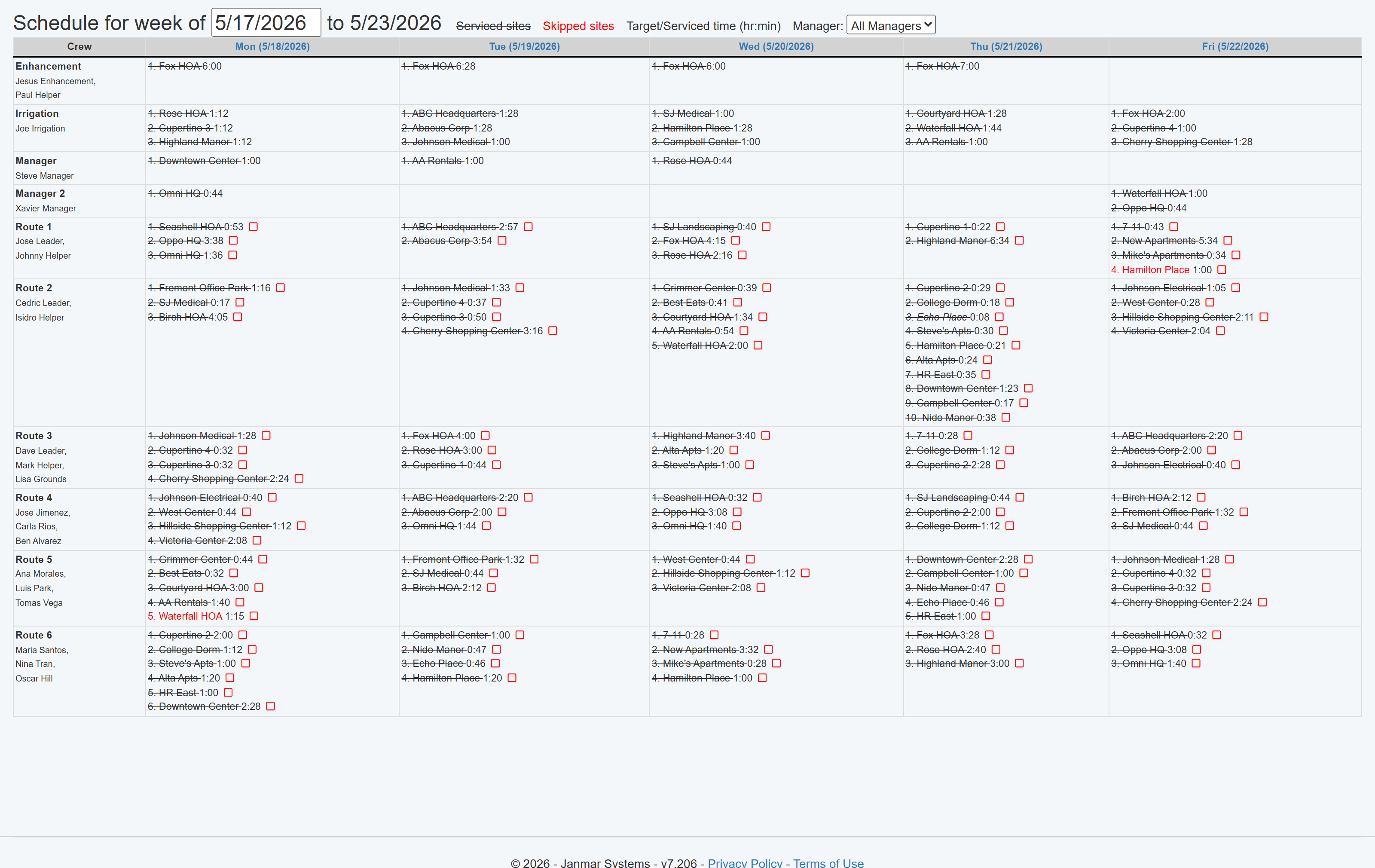
For a worked example of using visit durations to investigate a delay and check an improvement, see the workflow-fit guide.
Where route visibility starts paying you back. None of these asks the crew to enter anything. The crew leader keeps Field Assistant running with location access turned on, and GPS records the visits and time on site. Count them as route visibility's share of the return:
- Properties that keep running over budget: often the ones quietly losing you money. Compare each property's budgeted hours with the crew's actual time on site. A property that keeps running over is a candidate to reprice at renewal, rescope, or fix the cause, such as a locked gate. The same actual times give you a better basis for bidding similar properties. GPS labor costing shows that review. Crew hours aren't labor cost, though; confirm the loss with employee hours and rates before repricing.
- Quality problems caught early: a skipped site, or a property where time on site keeps coming in well under budget, is worth checking: work may be missed or rushed. Check it with the crew leader and the work record, and fix it before it becomes a complaint, a credit, a free return visit or a cancellation.
- Long days and overtime: when a route like Tuesday's keeps running past its planned day, moving a stop or two can cost less than paying the overtime. Compare overtime hours from payroll before and during the pilot.
- Route knowledge that stays with the company: when the one leader who knows the Tuesday route calls in sick, or a new leader starts, the route and jobsite instructions are already on the phone.
- Office time and property-manager questions: count the office's calls to find out where a crew was, and how long it takes to answer "were you there today?"
On the cost side, count the time to keep jobsites, assignments and routes current and to check missing activity. Repricing pays at renewal, so treat it like retention: real, but slower. This workflow doesn't recover missed extras or bill per-visit contracts. Those are later steps with their own checks.
Then choose the next workflow by the biggest line left in your payback check. Customer-request tracking, pesticide-use records, extras, estimates and material entries can be separate choices when they address another need, each with its own setup and recording duties. Required service and pesticide records still need keeping either way.
Field Service Cloud's Getting Started overview introduces the rollout path. Book a Live Walkthrough to evaluate the setup, staff time and first useful result for your company; bring one priority and this scorecard.