Will the software fit your landscape maintenance operation?
Janmar Systems · Field Service Cloud Resources
Your company has added properties, but the maintenance routes have grown one stop at a time. Nearby jobsites sit on different crews' days, some visits take longer than their original allowance, and less-frequent services make certain weeks heavier. The office needs a workable plan that crew leaders can follow. It also has customer concerns and completed extras to handle; improving route planning should not require changing all of those routines at once.
A demonstration can make each screen look straightforward. Your company has to make the handoffs work together, with the people, time and devices it actually has. Software can make instructions easier to find; your company still decides who gives them, who owns unfinished work and who checks the result. Test those responsibilities alongside the screens.
Start with one operating problem you want to improve. If you need help choosing it, use the software-selection value comparison. Use this guide to turn that priority into a demonstration your office and crew can try. Leave with a checklist of what can stay, what must change, who will maintain it and which requirements remain unproven.
Follow the work through an ordinary week
Choose a representative route or property and involve the office person, crew leader and manager who handle it. Ask each to describe where information comes from, what they do with it and who needs it next. Include the inconvenient parts: a late change, incomplete work, a missing record and a person covering for someone else.
Follow a change through the office, crew and manager views. Ask each person to find what they need next, then ask the manager what the records confirm. The route-planning comparison below tests whether the company can improve its existing method and choose the tools it needs, rather than adopt a prescribed process.
Bring this checklist to the demonstration
Copy the relevant rows and mark each requirement essential now, needed later or best kept in an existing tool. Ask the people who will do the work to perform the test.
| Test | What to try | What to record |
|---|---|---|
| Revise a recurring route | Place a new property, check nearby work and workload, then have a leader find the saved plan. | Required location/assignment data, optional planning tools, who maintains the plan and how crews receive it. |
| Record the work | Have the office retrieve the field entry or automatic record it needs. Include a missing update. | What the crew enters, what the office receives, and who follows up on a gap. |
| Leave work unfinished | Have the next person find responsibility, context and the next action. | Who owns what remains and who answers the customer. |
| Complete an extra | Follow quantities and approval through office review to the accounting result. | Who resolves a difference and confirms the transfer. |
| Improve the next plan | Review a recurring delay or concern with its source records. | Who decides the change and checks a later result. |
For each essential test, note what you saw work, the setup and daily duties it requires, and what you still need demonstrated. A company may need dependable routing now and retain its current billing process. A later requirement should not force unnecessary daily entry into the first rollout.
Compare updating the workflow with redesigning it
Suppose the manager currently keeps a route spreadsheet, checks locations in a separate map and sends revised sheets to crew leaders. The spreadsheet can still be a useful planning tool. The question is whether software makes the geographic decisions, workload checks and handoff easier enough to justify changing that method.
Update familiar routines where they already work
The manager could keep responsibility for planning and retain the existing crew groupings. Start by placing a new property near the crew's other work on a map, reviewing its existing visits and moving only what needs to change. Have the leader find the saved plan. If this removes separate map lookups and revised paper copies, it may be a useful improvement without changing how every route is planned. If the current tools already handle that well, test the harder question your company actually has.
This is still a change: someone prepares and maintains the plan and devices, the leader learns where to find current information, and the manager checks exceptions. Include those duties. An automatic activity record may help answer where the crew went, while confirming particular work may require a normal task update. Do not add a new field form unless the answer it supplies is needed.
Redesign the work when the existing routine is the problem
Now suppose every new property waits for the owner to choose its crew, several people change routes independently, and nobody checks the workload created by the combined changes. A map alone would preserve that responsibility problem. A useful redesign might give one manager authority to maintain the plan, set when a crew change needs approval, and establish who checks capacity and gives leaders the accepted instructions.
That proposal changes who decides and how exceptions are handled. Ask the provider to demonstrate it, including a dispatcher being away and a leader still following the old plan. Name who can make each decision, what staff must learn, which records they maintain and who follows up on incorrect use. Protected champion time, management support and training may make the broader change worthwhile. Without them, agree a smaller workable change or defer the redesign rather than assume the software will resolve ownership.
Compare the two against the same useful result
Can the manager maintain a geographically sensible, workable plan and can the leader follow the accepted version? Compare that result with today's process and record what stays and what changes under each option. The best choice may combine a familiar routine with one necessary responsibility change. Preserve useful practices, but do not preserve a recurring problem simply because it is familiar.
| Update familiar routines | Redesign the workflow |
|---|---|
| Keep roles and services. Put the plan on the phone. | Set who can change the plan, approve changes and own work left open. |
| Teach where to find the plan. Keep it current. Check gaps. | Teach new roles and steps. Cover absences. Check correct use. |
| Check which calls, copies or paper can stop. | Check whether clear roles resolve mixed instructions and work left open. |
The property-concern guide and field-to-billing guide describe routines you can improve with existing tools. If either matches a requirement here, use its provider-demonstration questions to test instructions, unfinished work, quantities or the accounting result.
Choose the route-planning help you need
Use the route problem to test three results with the provider. Keep your existing method as the comparison, including the spreadsheet and separate map if those work well today.
Where does the new work belong? Place a property among nearby visits and current crew assignments. Try moving a visit to a more sensible day without losing the others. A map should make geographic relationships easier to judge, not just decorate the stop list. Check the locations and assignments it depends on, what changes when a visit moves and how an unwanted edit is undone.
Can the crew do the proposed work? Review planned service durations and frequencies across several weeks, including every-other-week work. Ask how missing durations are identified; stop counts alone cannot establish capacity. Include travel and customer access requirements when judging the day. A shorter driving sequence can still put a time-sensitive customer in the wrong place. If you compare revenue, ask which prices and allocations it uses; revenue is not profit.
Will everyone work from the accepted plan? Have the leader find the saved route and instructions. Test a late revision and a phone without a connection. If a larger revision needs a draft, check which crews it covers, what remains live while you prepare it and how you choose when the new plan takes effect.
These tests need different preparation. Geographic placement may be useful with accurate locations and assignments alone. A dependable capacity answer also needs durations and frequencies. Ask whether you can use the tools that answer today's question while leaving the others unused, then record the information and review each result requires.
Check what the company must maintain after launch
Initial imports and training are only part of the commitment. Ask who will do the recurring work, how often and what happens when that person is away.
- Changing operations: who updates properties, services, routes, crew assignments, instructions and prices? Show how a new leader or office replacement learns the routine.
- Phones and connectivity: which phones and plans are needed? What can staff do without a connection, how do updates reach the office and how are missing updates noticed?
- Required records and reports: for the services and locations where you work, show the specific pesticide, service, time or other records your company needs, who reviews them and how staff retrieve the requested period. Confirm reporting suitability for your actual requirements.
- Existing systems: which information stays in accounting or other software, what transfers, what is entered twice and who resolves mismatches? Test the configuration you intend to use.
- Support and continuing training: who helps a crew leader in the field or an office person facing a failed handoff? Confirm support hours, what help is included and how new staff are trained.
- Correct use and follow-through: who checks that employees are following the workflow and leaving usable records? Show how missed entries or incorrect statuses are noticed, who follows up and how staff are coached. Allow management time for those checks after initial training and when people change roles.
- Continuing cost and access to records: what changes the bill as crews, users, storage, integrations or AI use grow? Ask what records and attachments you can retrieve if you change providers, in which formats and with what effort or charges.
Choose a concrete example for a requirement that matters. If a customer needs last quarter's service history, ask to retrieve that period with the relevant context. If an integration matters, see the result in the other system and how an exception is corrected. A promised export or supported integration needs enough detail to judge whether it serves your operation.
Use the records to make follow-up manageable
Ask the manager to use a report to find one exception, inspect its source record and identify the person responsible for the next action. An open customer request with no update is a useful test: can the manager tell what needs checking without reconstructing the day through calls and separate lists?
The report should make follow-up easier; someone still owns acting on it. The Crew Snapshot example below shows how to test that responsibility with a covering manager.
Choose useful measures without creating unnecessary crew work
Start with a decision the manager needs to make. A long KPI list creates little value if nobody can explain the source, review an exception or act on the result.
Trace one measure from records to a change
Suppose Tuesday's route repeatedly finishes late. This is an illustrative evaluation exercise, not a demonstrated customer result.
- Find the pattern. The manager compares planned stops with recorded visit durations over several Tuesdays. A repeated longer visit identifies one property to investigate. First check that the records and assignment are usable; a data gap can look like an operating problem.
- Find the cause. The manager reviews the longer visits with the crew leader. In this example, the crew repeatedly waits for access at a locked gate. The visit duration did not reveal the cause, and the manager does not treat the number as proof of poor employee performance.
- Change the work. The office confirms an agreed access arrangement, updates the gate instruction or visit timing, and gives the leader the current plan. The manager owns checking that the change is understood.
- Check later visits. Compare subsequent Tuesdays with the earlier pattern and ask the leader whether access improved. If the delay remains, investigate again rather than assuming the changed instruction solved it.
The example uses planned stops and activity records the company already collects, without adding a crew form. Open customer concerns can use the same approach: review existing task assignments, statuses and updates to identify what needs follow-up.
Separate three sources of information: automatically collected activity after the required setup; normal work records such as task updates and materials used; and additional entries made specifically for a more detailed measure. Agree who maintains the setup and checks missing or incorrect records at each level. An automatically collected number can still need office correction and management interpretation.
A report of crew time at a property can be useful on its own: it helps a manager find a long visit to discuss with the leader. If the next question is how much employee time the work used, add the appropriate timesheet and crew-assignment records. One crew working for an hour is one crew-hour; three employees each working that full hour contribute three man-hours. Check who was actually working and when, rather than multiplying every visit by an assumed crew size.
For labor costing, those employee hours also need the relevant rates and agreed costing inputs. Materials and other costs may be needed for a broader job-cost question. A company can get useful crew-hour visibility before adopting that detail; it should not mistake crew hours for complete labor cost or profitability. Quality measures likewise may need completed inspections. Ask the provider to show the inputs and continuing review required for the result you want.
For each proposed measure, write down the question it answers, the source records, who reviews it, how often and what action follows. Compare that benefit with additional collection, correction and review time. A stretched company can start with one useful exception review based on existing records and add detail when a recurring decision justifies it. Required records still need to be collected; reducing optional entry does not remove an obligation.
Test the requirements behind AI assistance
The AI management guide shows how to use AI for everyday work, including estimates and customer replies. Here, test what your proposed software and team must supply for a relevant task:
- Which records can it access, how current and complete are they, and can the manager inspect the sources?
- Which permissions apply, and can it change records or send information? Show the approval controls for any offered action.
- What setup, subscription or usage charges, input preparation, correction and human review must your company sustain?
Where available, try embedded AI, a connected AI application and your current method on the same question. Compare the result, preparation, review and charges.
Return the findings to your value comparison
Give competing providers the same ordinary work and exception. A comparison note might read: “The manager placed the new property using the map and checked the affected day's workload. Our office still maintains locations, assignments and planned durations. We have not yet seen how the leader receives the accepted plan when the phone has no connection.”
List the duties your team has agreed to own, the work that could stop and anything still untested or beyond the time you have, then take those findings to the software-selection value comparison.
Example: planning routes in Field Service Cloud
For the growing-route problem, start with what you already keep: jobsites, crews and which crew services each property on which day. The route map shows a crew's properties colored by service day, so you can spot neighboring properties serviced on different days before you change anything.
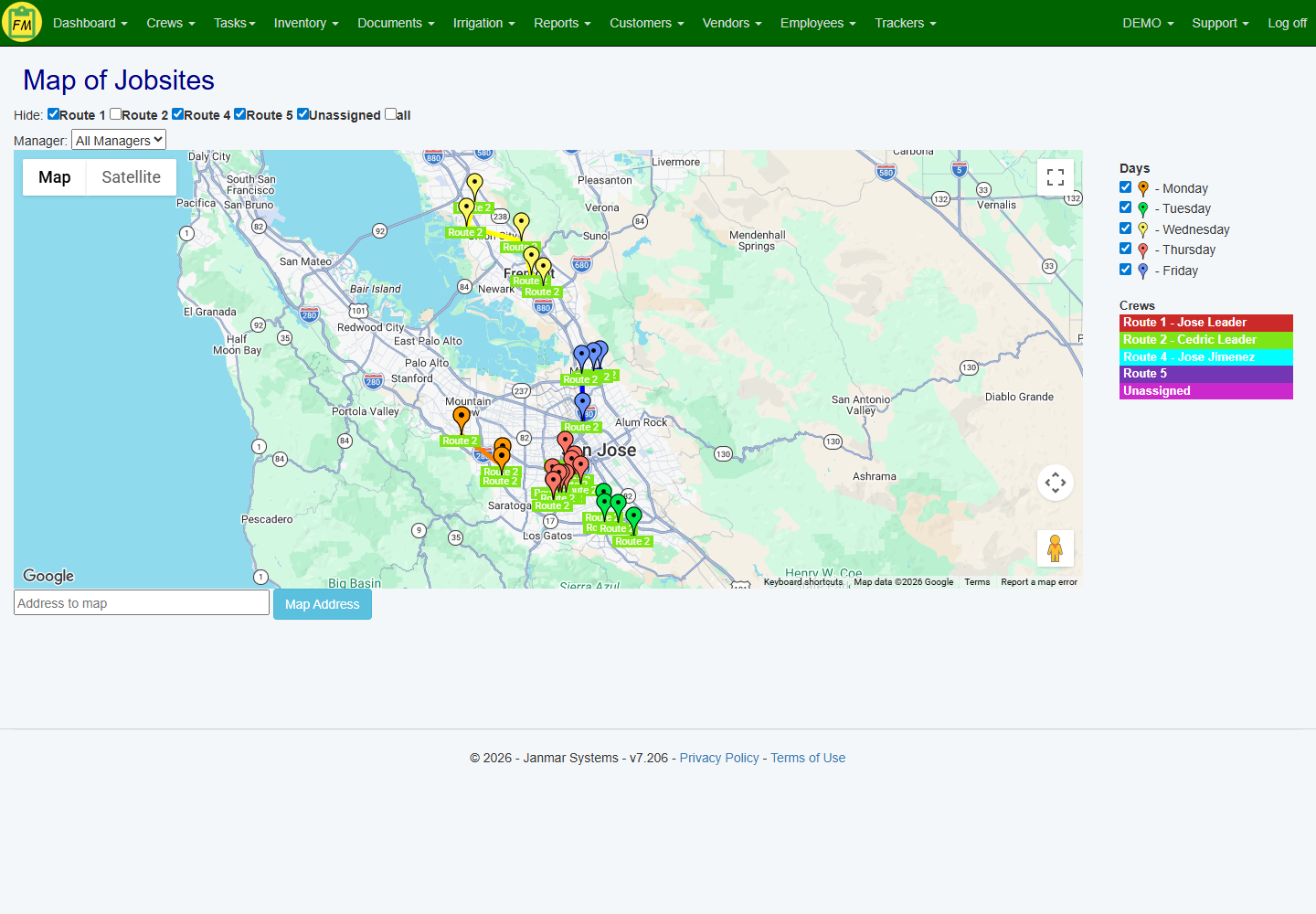
To fit in a new property, open the route and drag the visit to the day or crew that makes sense, or add nearby properties from the map. Before you save, you can put the day's stops in order and see its stop count and planned service hours, including what the move does to the day it came from. Nothing changes for the crew until the route is saved, so finish that step in the demonstration rather than stopping at the map.
Use only the planning detail you need:
- Weekly workload: enter service times and how often each property is serviced, and a four-week preview shows the heavy weeks, including every-other-week work. Fill in any missing service times; planned hours don't include drive time.
- Revenue: shows what the route's work is priced at, not what it earns after labor and materials.
- Stop order: suggests a driving order from the yard; you still check gate times and customer access.
- A bigger change to one crew: work on a draft copy while the crew keeps running its current route, then switch over when the draft is ready. A draft covers one crew, other crews' routes stay as they are, and pulling another crew's visits into the draft is limited, so test the exact change you need.
None of these is needed just to use the map.
Last, have the crew leader open the new route in Field Assistant. Saving in the office doesn't mean the phone has it yet; the phone has to sync first. Then decide which printed route sheets or calls you can drop.
Check on crews without asking for another report
Crew Snapshot puts a crew's last seven days on one screen: when its phone last checked in, hours worked, scheduled stops it skipped, and recent tasks with open and past-due counts, each linked to the details. It comes from the crew's GPS activity, once set up, and the task updates crews already enter in Field Assistant, so nobody fills out a separate report.
Try it with an open walkway request. Open the task and ask the crew leader whether the work is still open, the update was missed or it hasn't synced yet. Once the leader records the outcome, the account manager can answer the customer. GPS shows the crew was on site, not that a particular job was done. If the same gap keeps coming up, coach that step and check later tasks.
Have a manager who covers the account do the same and name who owns the next step. Compare the calls and hand-tallied lists this replaces with the time still needed to follow up. That ongoing review is what to put in your comparison.
Book a Live Walkthrough and bring your route problem and the open questions from your checklist.